Posts

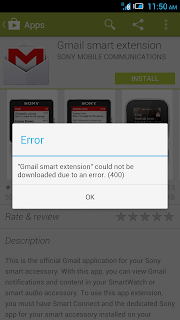
How to fix Playstore download error 400 or 403
Image
How to fix Playstore download error 400 or 403 (could not download from google play store due to error 400 or 403)    Method 1: The most common fix for most Android market or Google Play related errors. Go to system settings>> Accounts>>Google>>remove your Gmail account Now from settings>>Apps>>All> Force stop, Clear data and cache for Google Play Store, Google Service Framework, and Download Manager (like in method 1) Now again go to settings>> Accounts>>Google>>Add your Gmail account Restart your android and then accept all the Google terms and setup Google settings Rerun Google Play Store and update or install your app. Method 2-Clearing Proxy: (Usually Alcatel One Touch 6033x fixed by this method) Go to settings >> Wireless and Networks >> More >> Mobile Networks   APN (Access Point Name) >> Maxis or Celcom or Digi >> Edit Select clear Proxy option Try to re-...
How to unlock/bypass lock code iPad 4 version 6.1.3 with iTunes

Image
Recently I received an Apple iPad WiFi + Cellular (Model: A1460) which had nothing displaying on the screen. The only thing I knew it was connected to my PC (Windows 8 64-bit) was via the "USB sound" when connecting the iPad 4 via the lighting USB connector. Gather the software(s) below. (I won't be linking them here, just Google around. Unless you really can't find it email me) 1. iTunes 2. iPad 4 WiFi Firmware 3. iPad 4 WiFi+Cellular Firmware Follow the steps below. 1. Enter DFU Mode (you can search at youtube on how to do this) 2. Plugin your iPad 4 WiFi+Cellular & restore with iPad 4 WiFi Firmware *press shift+restore (You'll meet with an error if you try to use the WiFi+Cellular firmware) at the middle of the progress you'll hear the "USB disconnect sound" once you don't hear anything else, press & hold the power+home button till you hear the "USB connect sound" once you hear that make sure that you can see th...

Get a free copy of "Think & Grow Rich!"

Image
Doesn't that title intrigue you? Now its all yours FOR FREE! 1 million copies to be given away. Hurry while stocks last~! It's Already Created a Million Millionaires! Get Your Free Copy of Think and Grow Rich http://www.getthefreebook.com/cmd.php?Clk=4888620

How to manually configure your iPhone 4 access point. *Solve connect to cellular data*

Image
For some of us unfortunately you can't configure the access point straight from the "SETTINGS" menu in your iPhone 4. This is a website which will let you manually set and download it straight to your iPhone via WIFI connection 1. Connect your iPhone to the internet via WIFI. 2. Open Safari and visit help.benm.at 3. At the country selection page go to the bottom-most and select "Other or Custom" 4. Key-in your operator's name, access point, username & password. 5. Finally Download and Install the downloaded configuration. 6. Turn off your WIFI connection and try to use a cellular data connection to surf the web. That's all, hope this helped some of you. I've tested this on an iPhone 4 running version 4.3.3 Not sure whether it'll work on ios5...

Fixed & Solved BlackBerry Bold 9780 Can send but not receiving email issue.

Image
Found this solves the problem... Original link... http://supportforums.blackberry.com/t5/BlackBerry-Bold/Not-receiving-emails-on-my-Bold-9780/td-p/1094725 On your BlackBerry device, go to: 1. Options > Advanced > Host Routing Table > Menu > Register. 2. Resend your service books from your carrier BIS site: From your handheld device:   http://www.blackberry.com/btsc/KB15402 Go to the Personal Email Set Up icon and log in. Then under Help!, select Service Books, then select Send service Books. From your desktop PC:  http://www.blackberry.com/btsc/KB02830 North American Carriers - scroll down to select your carrier WorldWide Carriers - Find your carrier on the list 3. With the BlackBerry device powered ON, remove the battery a few seconds and then reinsert the battery to reboot. This reboot, even if you have already done this, is often needed to install the service books.

How to FIX - iPhone 4 - iOS5 update error 3002 (Solved)

Image
Hi, Today Apple Launched iOS5 many of us are eager to update and try it out but if you have a slow internet connection don't download the firmware via iTunes. (I tried twice with a couple of PC's but found out whenever it reached the 700mb mark - an error popped up stating that there was a fault in the connection and it was reset.) I wasted 700mb of data bandwidth due to this. (But my friend paid for me - YES 4G charging RM0.03 per MB) You have to search for the download link manually via GOOGLE. "If you don't know how to use Google then I will pray for you.) I've found a reliable source saying that the below is a direct link to the download: iPad 2:   iOS 5.0 iPad 2 (GSM):   iOS 5.0 iPad 2 (CDMA):   iOS 5.0 iPad 1:   iOS 5.0 iPhone 4 (GSM):   iOS 5.0 iPhone 4 (CDMA):   iOS 5.0 iPhone 3GS:   iOS 5.0 iPod touch 4G:   iOS 5.0 iPod touch 3G:   iOS 5.0 After you've downloaded the iOS5 firmware, the next step is to copy the firm...

Milo @ Seri Kenangan Tom

Image
The specialty is about the cup Published with Blogger-droid v1.6.4

How to link two D-link 2640T wifi routers using wireless bridge (WDS - Wireless Distribution System) and share your internet connection.

Image
Hope this helps... I spent 5 reckless and desperate days looking and trying to connect them... and boy when you succeed it's such a payoff. I've successfully connected 2 laptops via wifi, 3 pcs via cable, and 1 CCTV Dvr via cable on my primary router. 2 laptops via wifi, 1 network printer, 2 pcs, and 1 CCTV DVR all via cable on my secondary router. I was in despair when the computer store salesman told me that the D-link 2640T WDS function was not usable and access points for wireless bridging are not in production anymore... Until I found this manual for another model that has the same web management for D-link 2640T. Feel free to download and use it. Below are a few steps for preparation and other settings that are not included in the manual to speed things up before configuring your router. Follow the steps below. The best way is to use 2 sets of PCs and configure them at the same time, save you time and headaches...HAHA... 1. Prepare both your primar...

How to use your D-Link 2640T router to link up and remotely view 2 CCTV(DVR) system

Image
1st and foremost before you read this, pardon me if there were any errors or misleading guidelines found here k… this is just for sharing, I’m interested if there was another solution to it… Follow the steps below. 1. Get a www.Dyndns.org account if you have a dynamic ip. (Dynamic IP addresses change all the time when you connect to your internet service provider, on the other hand static IP will always remain the same and you can also check it via www.canyouseeme.org <–keep this handy we’ll use it later) 2. Make sure both of your CCTV / DVR system supports network viewing. Set both systems to have different individual static ip and ports. Example : 1st DVR system IP ADD = 192.168.1.122 [port = 98] 2nd DVR system IP ADD = 192.168.1.123 [port = 99] 3. Now log in to your D-Link router via http://192.168.1.1(default username = admin and password = admin) and select the Dynamic DNS page. There you will see a dropdown box with the option to select the www.dyndns.org account...